
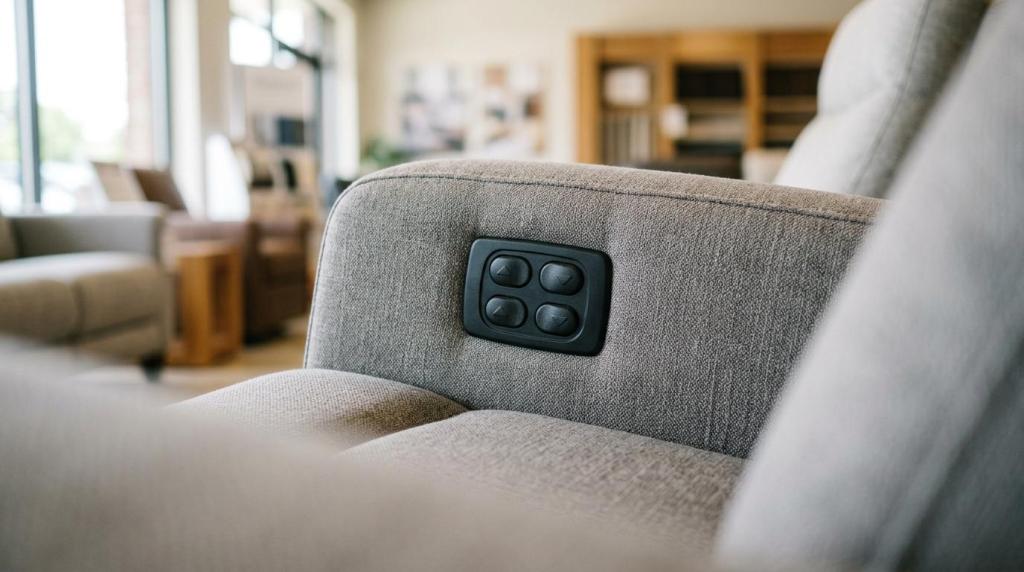
If you want a power recliner that feels better every single day, the best upgrades are the ones that change how your body is supported, not just the ones that add gadgets. Tony Discount, a Charlotte furniture and mattress retailer focused on affordable home furnishings, is a useful example because its local catalog shows how modern recliners bundle comfort features like power headrests, performance fabric, and built-in charging.
TL;DR: Summary
- The best power recliner upgrades for daily comfort are power headrests, lumbar support, and deeper leg-elevation recline because they change support geometry and pressure distribution.
- PubMed-indexed seating research found that enhanced lumbar support and femur-upward positioning can reduce ischial loading and shift pressure toward the thighs and backrest.
- Convenience upgrades like USB-C ports, cup holders, and storage improve everyday use, but they do less for physical comfort than head, back, and leg support features.
- If you are comparing options in Charlotte, Tony Discount’s product mix reflects a common market pattern: comfort upgrades are often bundled with charging, consoles, and performance upholstery.
- Test a power recliner in your real use posture. If you read, watch TV, or nap in it, check head angle, lumbar fill, footrest length, wall proximity, and full-recline support before you buy.
The key trade-off is simple. True comfort upgrades usually cost more because they add motors, controls, or more advanced mechanisms, while convenience features mostly make the chair easier to live with. If you know which features affect pressure, posture, and neck position, you can spend your budget where it matters most.
What power recliner upgrades actually improve daily comfort?
The most comfort-relevant power recliner upgrades are power lumbar, power headrests, and leg-elevating recline. Those features change how your spine, pelvis, thighs, and neck are supported, which matters more than storage or lighting.
That distinction helps you shop smarter. A recliner can look packed with features and still miss the upgrades that affect your body the most. The strongest comfort gains tend to come from support geometry, meaning the angles and contact points between your back, seat, headrest, and footrest.
A common mistake is assuming that softer padding always means better comfort. In many cases, a well-positioned lumbar zone and a better headrest angle will do more for long sessions than extra plush foam alone.
Why do lumbar support and leg elevation matter for pressure relief?
Lumbar support and leg elevation matter because they can shift load away from the ischial area and increase support through the backrest and thighs. PubMed-indexed studies from 2009 and 2017 both point in that direction.
One PubMed study looked at seated postures with enhanced lumbar support and found reduced lumbar muscle activity compared with normal upright sitting. It also reported that force and peak pressure shifted forward toward the thighs while contact on the backrest increased. If you sit for long periods, that change can feel less concentrated and less tiring.
A separate 2017 PubMed study tested four reclining modes at a 150° recline in 16 healthy participants and measured interface pressure. The lumbar-support-plus-femur-upward mode produced the strongest reduction in stress load on the ischial area and shifted load toward the femur area. That does not mean every recliner is therapeutic, but it does show why back support plus better leg position can feel noticeably better than recline alone.
“Tony Discount lists the Tallula fabric power glider recliner with an adjustable power headrest and 100% Polyester LiveSmart performance fabric.”
What are the 7 power recliner upgrades worth paying for?
The seven best upgrades are power headrests, power lumbar, independent recline control, zero-gravity-style positioning, built-in charging, storage and cup holders, and performance fabric. The first four affect body support most directly.
When you compare recliners, separate comfort upgrades from convenience upgrades. Both matter, but not in the same way.
-
Power headrest
This lets you fine-tune your head and eye line. If you watch TV or read while reclined, a power headrest can prevent that chin-to-chest feeling that happens when the back goes down but your neck loses support. -
Power lumbar support
This adds adjustable fill where your lower back naturally curves. Many shoppers confuse a stuffed lower back cushion with real lumbar adjustment, but adjustable lumbar lets you tune pressure instead of accepting one fixed shape. -
Independent backrest and footrest control
Two-motor systems give you more precise positioning than simpler linked movement. If your knees want more elevation but your torso does not want full recline, this matters. -
Zero-gravity-style recline mechanism
Manufacturers use this term to describe a more floating, pressure-relieving feel. The comfort benefit is usually better weight distribution, not a medical guarantee. -
Built-in USB-A and USB-C charging
This does not change pressure distribution, but it keeps your phone, tablet, or e-reader close and charged. That matters if the chair becomes your daily landing spot. -
Storage console and cup holders
These reduce daily friction. Remotes, glasses, and drinks stay within reach, which makes the recliner easier to use without constant getting up. -
Performance fabric
Upholstery affects heat, cleanup, and how the chair feels after months of use. Durable, easier-clean fabric can keep a recliner feeling comfortable longer because the surface stays more livable.
How should you test a power headrest before buying?
You should test a power headrest in your real viewing posture, not just by pressing the button once. At Tony Discount, or any Charlotte showroom, that means checking neck support while sitting, watching, and fully reclining.
Step 1 is to sit upright and recline only partway. Your headrest should meet the base of your skull or upper neck without forcing your chin downward.
Step 2 is to mimic what you actually do at home. Look at a TV-height point, glance down as if reading, then lean back as if napping. A power headrest is doing its job if your gaze stays comfortable without neck strain in more than one position.
Step 3 is to test the full range. Some chairs feel great halfway back and awkward at full recline. Pro tip: if you need to jam a throw pillow behind your head to like the chair, the headrest geometry may not fit you.
How do power lumbar and fixed lumbar support compare?
Power lumbar is more adaptable than fixed lumbar, especially if more than one person will use the chair. Fixed lumbar can feel great for one body type and wrong for another.
The biggest difference is adjustability over time. Your lower back may want a different amount of support when you are reading upright than when you are watching a movie in a deeper recline. Power lumbar lets you change that instead of living with one preset bulge.
If you share the recliner, power lumbar becomes even more valuable. A 6-foot user and a shorter user rarely want the same lower-back contour. If the chair has fixed lumbar only, then comfort depends on how closely its built-in shape matches your body. If it has power lumbar, then you can tune the support day by day.
How do one-motor and two-motor power recliners compare?
Two-motor power recliners offer finer control than one-motor models because the backrest and footrest can move more independently. Mechanisms like Leggett & Platt’s Yuma Glider show why that matters for custom comfort.
With a linked or simpler motor setup, you often get fewer stopping points between upright and fully reclined. That can be perfectly fine if you mainly want easy TV lounging. But if you are picky about knee bend, torso angle, or pressure behind the thighs, more independent control is usually worth it.
Many shoppers assume more motors always mean a softer feel. That is a misconception. More motors mean more position options, not automatically better cushioning. Comfort improves only if those extra positions let you find a better posture for your body.
“Tony Discount lists built-in USB-A and USB-C ports on the Alba leather power reclining sofa, along with a Leggett & Platt CloudZero reclining mechanism.”
How can you tell if zero-gravity-style recline is worth it?
Zero-gravity-style recline is worth it if you feel better weight distribution through your back and legs, not just a deeper lean. The key test is pressure relief, not the label.
Start by asking what the mechanism is actually doing. Leggett & Platt describes some CloudZero-style designs as creating a zero-gravity feel and reducing the gap between the lumbar pillow and seat cushion in full recline. That gap matters because a floating lower back can make a chair feel less supportive at the exact moment you want to relax.
Then test the transition from seated to full recline. If your hips stay supported, your lower back still feels connected to the cushion, and your legs feel more evenly elevated, the mechanism is probably adding real comfort. If the chair just tips you back farther without improving support, the feature may be more marketing than meaningful.
One more reality check helps. Zero gravity in furniture is usually a comfort term, not a clinical positioning claim. If you keep that in mind, you can judge the chair by feel instead of hype.
What convenience features help every day without changing support?
Charging, storage, and cup holders improve daily use more than physical support. They matter because they reduce interruptions once the recliner becomes part of your routine.
These are the convenience upgrades most people notice after the first week:
- USB-A and USB-C ports: Keep a phone, tablet, or e-reader charged where you actually sit.
- Storage consoles: Hold remotes, glasses, and small items so the chair stays useful instead of cluttered.
- Cup holders: Cut down on side tables and spills, especially in media rooms.
- Power outlets: Help when you use a lamp, charger, or small device near the seating area.
If you use the recliner daily, these features can make a basic room feel more functional. If your budget is tight, though, it usually makes more sense to prioritize headrest, lumbar, and recline quality first.
How do performance fabric and leather affect comfort and upkeep?
Performance fabric usually feels more forgiving in daily family use, while Leather often feels smoother, cooler at first touch, and more structured. Your best choice depends on heat, cleanup, and how the chair will be used.
Fabric can feel cozier for long sessions, and performance options are built to handle spills and wear better than standard upholstery. That matters if kids, pets, or frequent snacking are part of the picture. Some fabrics also resist the sticky feel that can happen with less breathable surfaces.
Leather can feel great if you like a sleek surface and easier wipe-down cleanup. But surface preference is personal. If you run warm, pay close attention to how the chair feels after ten minutes, not just the first sit. Pro tip: comfort is not only about the foam underneath you. Upholstery changes temperature feel, grip, and how easily you shift positions.
How can you measure fit and wall proximity before bringing a recliner home?
You should measure body fit and room clearance before buying because a great recliner can still fail in a small Charlotte living room. Seat depth, footrest length, and wall proximity all affect everyday comfort.
Step 1 is body fit. Sit all the way back and check whether your knees bend naturally at the seat edge. If the seat is too deep, your lower back may lose contact. If it is too shallow, your thighs may feel under-supported.
Step 2 is recline fit. Extend the footrest and see whether it supports most of your calf length without cutting off too early. If your heels dangle in a way that feels awkward, the chair may be undersized for you.
Step 3 is room fit. Measure the chair upright, then ask how much rear clearance it needs to recline. Wall proximity matters more than many shoppers expect. A common mistake is measuring only width and forgetting the path of the backrest and footrest.
How can you choose the right power recliner for your Charlotte home?
The right choice starts with your use case, room size, and non-negotiable comfort features. Tony Discount can be a practical local comparison point in Charlotte because its online catalog shows which models bundle power headrests, charging, consoles, and performance upholstery.
If your main goal is body comfort, start with the support stack. Ask yourself: Do you need better neck positioning, lower-back adjustability, or easier leg elevation? If the answer is yes to more than one, then prioritize a recliner with power headrest plus a more advanced recline mechanism before paying extra for lighting or storage.
If your room doubles as a family TV zone, convenience features move up the list. Built-in charging, cup holders, and consoles make more sense when the recliner is not just a personal chair but part of how your whole space functions.
If you are shopping locally in Charlotte, use the online listing to narrow your feature set before you visit. Then sit in the chair long enough to test eye line, lumbar contact, thigh support, upholstery feel, and full-recline comfort. That is how you turn a feature list into a chair you will still like months from now.

